Six weeks after Microsoft took down EvilTokens, a detection I’d written for it started firing again. Further investigation led me to a device code phishing platform that appears to serve several customers from one shared backend – one that might predate the takedown.
Updated November 7: added a sixth backend, the monday.com redirect hop, and a credential-harvesting kit seen behind the same redirector.
How It Started
Earlier this year I spent a good chunk of time chasing device code phishing emails. My first guess was Tycoon2FA, which LevelBlue had reported experimenting with device code lures. That is, until I started finding public sandbox reports that attributed the indicators I was seeing to EvilTokens, the phishing-as-a-service platform Sekoia wrote up back in March.
Most of what I pulled out of those emails was the usual disposable stuff – domains that lived for a day, S3 buckets with random names, redirect hops that changed every wave. One thing didn’t change, though: every link started with a TikTok redirect carrying a parameter that had no business being there:
tiktok.com/link/v2?aid=1988&lzdlang=enFSmPWg&scene=bio_url&target=...
lzdlang isn’t a parameter TikTok’s link handler normally carries – Hoxhunt’s write-up of the same redirect shows a plain lang=en in that spot – and enFSmPWg isn’t a language code anyone would recognize. It survived every kit rebuild I saw, so I built my detections around it.
Then on September 22nd, Microsoft announced it had taken down EvilTokens’ infrastructure, and the detection went quiet.
But you know what they say… everything old is new again. In the world of cyber, this cycle can be measured in months or weeks rather than years or decades.
After about six weeks of silence, the detection fired again. When I detonated the link in a sandbox it still ended up at Microsoft’s device code login page. Whatever had changed behind the scenes, the goal hadn’t.
What Is Device Code Phishing?
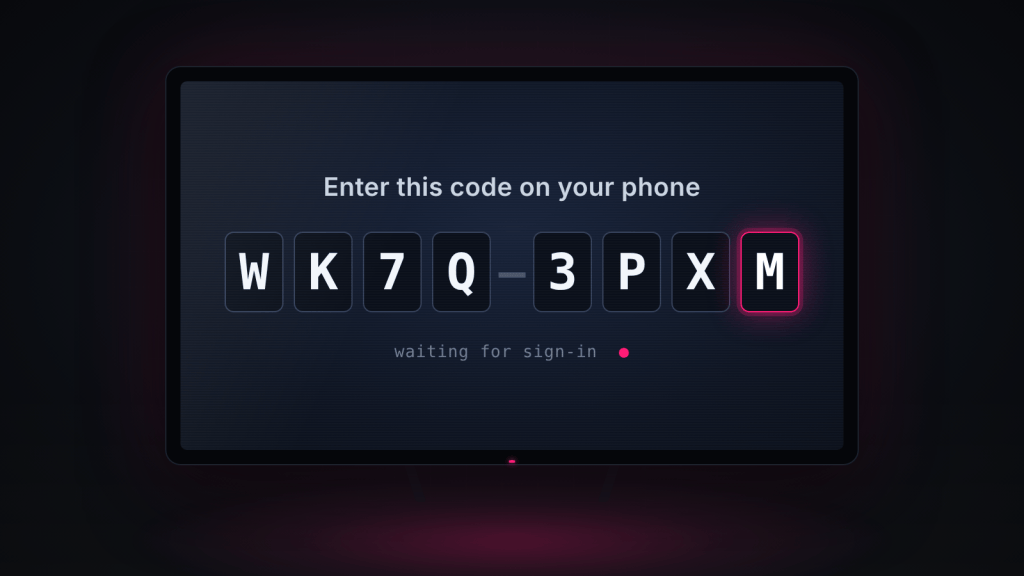
If you’ve ever signed into a streaming app on a smart TV, you’ve used the device code flow: the TV shows a short code, you type it in on your phone, sign in there, and the TV is logged in.
Device code phishing puts the attacker in the TV’s seat. The phishing page has the attacker’s backend request a code from Microsoft, the victim enters it on the real microsoft.com/devicelogin webpage and signs in – password, MFA and all. The attacker walks away with a valid access token and a refresh token for their account. Because the victim completed MFA, those tokens already show MFA as satisfied, and the attacker can keep using the refresh token to get new access tokens without ever triggering another MFA prompt.
The nasty part is that nothing about the sign-in is fake. The victim is on Microsoft’s real login page, answering their real MFA prompt – they just don’t realize they’re approving someone else’s session. The only real constraint for the attacker is time: the code expires 15 minutes after it’s requested, which is why kits now generate it the moment someone lands on the page. Microsoft and Sekoia both cover the mechanics in more depth (see References).
Following the Redirect Chain
I detonated one of the new links in a sandbox and followed it hop by hop:
- TikTok:
tiktok.com/link/v2?...&scene=bio_url&target=...– the profile-bio link handler, which Hoxhunt pointed out back in 2024 doesn’t validate thetargetat all. - Google DoubleClick:
adclick.g.doubleclick.net./pcs/click?CIO7IfjWKRXTAP84695-novemberkd&&adurl=...– an ad click tracker used as a second open redirect. Another wave swapped this hop for NetEase’s enterprise mail redirect (qiye.163.com/api/j/re?c=...) and left everything else alone. In the November 5 wave, some links added one more hop after it: monday.com’s email tracker (trackingservice.monday.com/tracker/link?token=...), with a single signed token reused for every recipient. - Amazon S3: a page in a bucket with a generated name along the lines of
<word>-<word>-<word>-<12 digits>-us-east-1-<xx>(sometimes with dots instead of hyphens) – filler words, a fake 12-digit AWS account number, and a region. - Bunny CDN: the lure itself, on a pull zone with a long, generated, document-themed name (strings like
document,review,sign, andfolder, plus a run of digits) – a “Microsoft Identity Verification” box with an “I’m not a robot” button. Clicking it fetches a device code from the kit’s backend, copies it to the clipboard, and opensmicrosoft.com/devicelogin.
Borrowing TikTok’s and Google’s reputation for the first two hops is the obvious trick. Three less obvious ones matter more if you’re writing detections:
- A trailing dot.
adclick.g.doubleclick.net.is a fully qualified domain name. It resolves fine, but it breaks string matching that expects the hostname to end in.net. - Encoding. In some waves the S3 address was hex-encoded, and in older ones it was percent-encoded twice. You can’t match the landing domain until you decode it.
- The recipient rides in the fragment. Links end with something like
#<hex>Farnily=<base64>, where the base64 decodes to the recipient’s address so the page can prefill it. Browsers never send the part after#to the server, so anything watching only server-side requests never sees it. The key changes spelling between waves (Family,Farnily,...mJmily, and?e=on the monday.com links), and one wave skipped TikTok entirely and put it in plain text on an AWS Lambda function URL (?tomboy=farnily=<email>).
The mail itself was borrowing reputation too. Some of the November 5 messages were injected into Microsoft 365 tenants and relayed back out through Microsoft’s own mail servers, so they arrived passing SPF and DKIM.
The page also does nothing interesting until someone clicks. It’s built in the browser from a blob: URL, and the device code is only requested after the “I’m not a robot” click, so a scanner that loads the page and leaves just sees a harmless verification box.
The Part That Didn’t Change
Here’s what surprised me. While digging through public sandbox reports, I found a Joe Sandbox analysis from March 27th with the exact same TikTok link – same lzdlang=enFSmPWg, same DoubleClick token, CIO7IfjWKRXTAP84695-novemberkd, down to the character. That chain didn’t end at a device code page at all. It ended at a credential harvester flagged as Morphing Meerkat, the phishing-as-a-service platform Infoblox wrote about earlier this year. IronScales described the same TikTok-to-DoubleClick pattern in August, ending at yet another bot-gated login page. TikTok redirects even show up in Microsoft’s write-up of Tycoon2FA, a completely different kit, although I can’t tie that to this particular template.
So the redirector isn’t part of any one kit. It’s a delivery template that has carried at least two different kits over more than seven months, and it kept working through a major takedown of one of them. The only part of the DoubleClick token I’ve seen change is the suffix, which looks like a month name (novemberkd). The prefix hasn’t moved.
I didn’t have to go back to March to see that, either. On November 5, the same lzdlang=enFSmPWg link sent some recipients to this device code kit and others, through monday.com and NetEase, to a fake Microsoft sign-in page. Given a real address, that page pulled the target organization’s own sign-in branding and asked for a password, which points to a credential harvester.
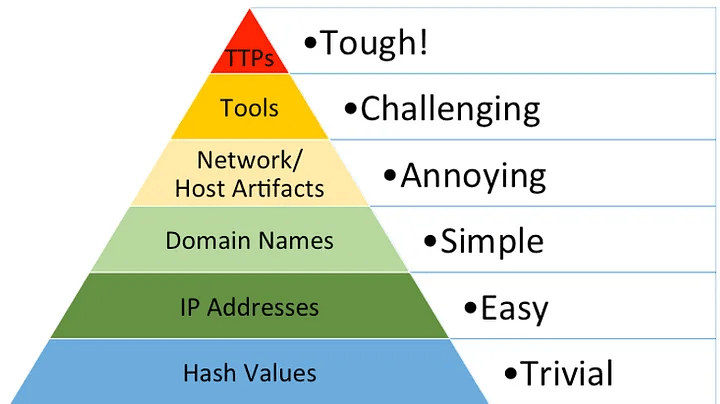
In my introduction to threat hunting I talked about David Bianco’s Pyramid of Pain, where things like domains and hashes sit near the bottom because they’re trivial for an adversary to change. Strictly speaking, a URL parameter belongs down there with them. This one has been more durable in practice, though, than any domain, bucket, or landing page I’ve tracked in this campaign. My best guess is that whoever maintains the delivery side simply has no reason to touch it – it works, and changing it means rebuilding a template that several customers depend on.
The lesson I’m taking from this isn’t “hunt for lzdlang” (although you should). It’s that the most useful indicator in a campaign isn’t always the one highest on the pyramid. Sometimes it’s the boring piece the operators forgot they could change.
Pulling the Thread
The sandbox run gave me the kit’s backend: v1.quikrq[.]com, a domain registered on September 29th – one week after the takedown. The lure page talked to it through three endpoints:
GET /static-export/api/visitor/countryPOST /static-export/api/device/startGET /static-export/api/device/status/<numeric id>
The device/start request carried an X-Antibot-Token header with the value bigsnoop_1. If that header sounds familiar, it should – Sekoia documented the same header and the same device/start / device/status design in EvilTokens back in March.
Searching urlscan.io for scans that requested static-export/api/device turned up five more lure pages that had been submitted over the last few weeks. I pulled the full JSON for each scan, and that gave me another four backend domains, all of which sit behind Cloudflare:
| Backend | Front end it served | X-Antibot-Token |
|---|---|---|
v1.quikrq[.]com | Bunny CDN pull zone | bigsnoop_1 |
r3.gamingextol[.]pw | Attacker-registered domain | lordspartaa |
s3.meazonwaves[.]org | Bunny CDN pull zone; Linode Object Storage bucket | SNVL23 and a UUID |
c22.turnerandtownsend[.]net | Attacker-registered domain | Getbusy21 |
alliedplpefreezing[.]co[.]uk | Attacker-registered domain | A UUID |
teamsmeeting.weupdaa[.]workers[.]dev | AWS Lambda function URL | xoxohfhf |
A later sandbox run added the sixth. The Lambda URLs led to teamsmeeting.weupdaa[.]workers[.]dev, which made the same device/start and device/status calls with its own fixed token, xoxohfhf.
Two things here jumped out at me.
First, the X-Antibot-Token. Sekoia described EvilTokens’ version as a SHA-256 hash of a secret, a timestamp, and the word “antibot”, where the secret most likely acted as a license key. These are fixed strings instead, and one backend served two different ones – which looks a lot more like customer keys on shared infrastructure than one operator’s setup. Every backend on its own domain also sits on its own pair of Cloudflare nameservers, which usually means a separate Cloudflare account – one more reason to read this as a shared platform.
Second, two of the backend domains are dressed up to look like real businesses. One swaps a single letter for a lookalike (plpe for pipe), the kind of thing that’s easy to read right past. The other borrows a real company’s name under a different TLD – but it was registered in July and sits behind Cloudflare, so it’s an imitation, not the company’s own domain. Either way, check before you block anything close to them.
The front ends were consistent, too: every one sat behind a Cloudflare Turnstile challenge, built its page from a blob: URL, and several returned their first document with an HTTP 403 status – content and all. Anything that judges a page by its status code writes it off as dead.
One Counter, Six Backends
This is the part I keep coming back to. The device/status/<id> calls use a plain number as the session ID, and when I lined the scans up by date, the numbers only ever incremented – across every single backend domain:
| Scan date (UTC) | Backend | Session ID |
|---|---|---|
| Oct 20 | alliedplpefreezing[.]co[.]uk | 462285 |
| Oct 22 | c22.turnerandtownsend[.]net | 475456 |
| Oct 27 | s3.meazonwaves[.]org | 508384 |
| Oct 28 | s3.meazonwaves[.]org | 510265 |
| Oct 29 | r3.gamingextol[.]pw | 523299 |
| Nov 5 | v1.quikrq[.]com | 575839 |
| Nov 7 | teamsmeeting.weupdaa[.]workers[.]dev | 594204 |
Six unrelated backends don’t produce one rising sequence by accident. My assumption is that the backend domains are just relays, and sitting behind them is a central database handing out session IDs. That fits Sekoia’s description of EvilTokens affiliates, whose pages relayed requests to a central API.
The counter also gives a rough sense of scale. Between scans it climbed anywhere from about 4,000 to 10,000 a day, averaging around 7,000. That’s every page load that asked for a device code – sandboxes and scanners included – so it’s not a victim count, but it’s not a small operation either.
At roughly 7,000 page loads per day, it would take about 80 days to reach 575,839, which would put the start somewhere around mid-August – a month before the takedown. That assumes the counter started at zero, though.
There are three ways to read that number:
- If it started at zero, the platform predates the takedown.
- If it picked up where an older database left off, it’s a continuation of something older.
- If someone seeded it with an arbitrary starting value, it reveals nothing about age at all.
On its own, the counter can’t settle the timeline – but as it turns out, it isn’t the only evidence.
The backend domains themselves add to that. Two of them are aged lookalikes of real businesses, registered through Namecheap well before the takedown – one in September 2025, the other in July 2026. Passive DNS shows both were deliberately set up with Zoho mail, then sat dormant until they were moved behind Cloudflare and pressed into service as backends within a day of each other in late October. A third, the backend from my sandbox run, was registered through Hostinger on September 29th, 2026, one week after the takedown.
The registration dates don’t tell me when this platform was built. They do tell me the people running it were already holding infrastructure long before September 22nd, and registering fresh domains within a week of the takedown – which suggests they were planning ahead.
So Is EvilTokens Back?
Short answer: not exactly.
As for Tycoon2FA, my original suspect back in August: now that I can see what’s behind these emails, the mechanics don’t fit. Tycoon2FA is an adversary-in-the-middle kit – a reverse proxy that sits between the victim and Microsoft and steals the session cookie – and nothing in this flow proxies a login. The victim signs in on Microsoft’s own page, and the backend’s API lines up with EvilTokens down to the endpoint names.
Here’s how this platform lines up against what Sekoia published about EvilTokens in March and April:
| EvilTokens (Sekoia) | This platform | |
|---|---|---|
| Start a code | POST /api/device/start | POST /static-export/api/device/start (one backend drops the static-export prefix) |
| Check status | GET /api/device/status/{id}, dev_ IDs, every 3 seconds | GET /static-export/api/device/status/<number>, every second |
| Anti-bot token | SHA-256 of secret + timestamp + “antibot”, computed in PHP | Fixed string, apparently one per customer |
| Lure page | Encrypted HTML decrypted and injected by script | Built from a blob: URL behind Cloudflare Turnstile |
| Hosting | Cloudflare Workers, Railway, affiliate PHP relays | Bunny CDN, Linode, attacker domains; backends behind Cloudflare; one backend on Cloudflare Workers |
The API matches EvilTokens path for path, so whoever built this either had EvilTokens’ code or copied its design very closely. Some of the differences even make sense as a port: EvilTokens computed its rotating token in PHP every time the page loaded, and a static page sitting on a CDN has no server code to do that, so a fixed token is what you’d expect. That static-export path name points the same way.
The hosting tells a similar story. EvilTokens leaned on Cloudflare Workers for its lure pages and Railway for token relay. Cloudflare killed the Workers projects as part of the takedown, and Huntress had already pushed a block on Railway across more than 60,000 tenants. Railway doesn’t show up anywhere in this platform’s infrastructure, and until November, neither did Workers. Then one backend turned up on a fresh workers.dev subdomain, calling EvilTokens’ original /api/device/ paths instead of static-export. It isn’t a leftover piece of EvilTokens, though. It hands out session IDs from the same counter as the other five, and its token is another fixed string. It’s the same platform, borrowing one more thing straight from EvilTokens.
But the session counter complicates the idea of a simple post-takedown rebuild. It uses a different ID format from EvilTokens, and the evidence in the previous section says the people behind it were already holding infrastructure well before the takedown. As I see it, that leaves four possibilities:
- An offshoot of EvilTokens, built from its code.
- An affiliate that grew into its own operation. There’s precedent for this one: Talos wrote up an EvilTokens affiliate panel in July that shared EvilTokens’ API contracts and infrastructure patterns.
- A competitor that cloned the API.
- EvilTokens’ own operators, building somewhere new ahead of time.
The last option doesn’t require any inside knowledge of the takedown. By August, Sekoia, Microsoft, Huntress, and Talos had all published on EvilTokens, and anyone watching their infrastructure get picked apart that publicly would plan for disruption as a matter of when, not if.
From the outside I can’t tell which. What I am comfortable saying is this: it’s the same design, it serves more than one customer, and it’s still sending. Microsoft’s takedown hit EvilTokens’ infrastructure. It doesn’t appear to have touched this. Microsoft said as much in its own announcement: “The infrastructure supporting EvilTokens has been disrupted, but the model it demonstrated will not disappear with it.”
It also wouldn’t be the first time. When Europol and Microsoft disrupted Tycoon2FA in March, CrowdStrike saw its daily volume drop to about a quarter of normal, then climb back to pre-takedown levels by the time they published two weeks later – often on domains that had been registered months before the takedown. Takedowns cost operators infrastructure and time, and that matters. They don’t end the operation.
What to Hunt For
The first query is a Sentinel query, since that’s where sign-in logs live; the other two are for Defender XDR advanced hunting (swap Timestamp for TimeGenerated in Sentinel).
Find out who actually uses device code flow.
If you only do one thing from this post, make it this one:
SigninLogs| where TimeGenerated > ago(30d)| where AuthenticationProtocol == "deviceCode"| summarize SignIns = count(), Users = dcount(UserPrincipalName) by AppDisplayName, ClientAppUsed
Assuming that it comes back nearly empty, I recommend blocking device code flow with a Conditional Access policy (the Authentication flows condition) and excluding whatever legitimately needs it. Every detection below chases infrastructure the operators can change. That policy doesn’t care where they move next.
If you do find a device code sign-in tied to one of these lures, revoke the user’s sessions and refresh tokens. A password reset on its own doesn’t end the attacker’s access.
Alert on what got delivered, not what got blocked.
My original detection only matched messages that were already in quarantine, which is great for tracking a campaign and useless for catching the ones that reach an inbox.
This is the version I run now. It returns one row per message and recipient, so it’s safe to run as a custom detection rule with a soft-delete action:
EmailEvents| where EmailDirection == "Inbound"| where DeliveryLocation !in ("Quarantine", "Dropped", "Failed")| join kind=inner ( EmailUrlInfo | where Url has "lzdlang=enFSmPWg" or (Url has "tiktok.com/link/v2" and Url has "CIO7IfjWKRXTAP84695") or Url contains "arnily=" | project NetworkMessageId, Url ) on NetworkMessageId| summarize arg_min(Timestamp, *) by NetworkMessageId, RecipientEmailAddress| project Timestamp, ReportId, NetworkMessageId, RecipientEmailAddress, Subject, SenderFromAddress, SenderMailFromDomain, SenderIPv4, Url, DeliveryLocation
Note the contains on the fragment key. has only matches whole terms, and the key is glued onto a hex string (...3c3bFarnily=), so has quietly misses it.
Hunt for your own address in the fragment.
Plenty of phishing kits besides this one hide the recipient’s base64 address after the #, and almost nothing legitimate does. Base64 encodes your domain three different ways depending on what comes before it, so generate all three first (PowerShell):
$domain = "@example.com"foreach ($k in 0..2) { $bytes = [Text.Encoding]::ASCII.GetBytes(("A" * $k) + $domain) $b64 = [Convert]::ToBase64String($bytes) $core = $b64.Substring(@(0, 2, 3)[$k]).TrimEnd("=") $core.Substring(0, $core.Length - 1)}
EmailUrlInfo| where Timestamp > ago(30d)| where Url matches regex @"#[^#]*(?:<string1>|<string2>|<string3>)"| join kind=inner ( EmailEvents | where EmailDirection == "Inbound" | project NetworkMessageId, RecipientEmailAddress, DeliveryLocation ) on NetworkMessageId| summarize Messages = dcount(NetworkMessageId), Sample = take_any(Url) by UrlDomain, DeliveryLocation| order by Messages desc
Requiring the # is what makes this usable – without it you’ll drown in marketing and unsubscribe links. Expect a few legitimate senders to exclude by domain, and don’t rely on it alone: EmailUrlInfo doesn’t seem to keep the fragment on every URL.
Indicators
Note: Two of the backend names resemble real businesses – one is a lookalike with a single swapped letter, and the other imitates a real company’s name under a different TLD. Double-check before blocking anything close to them.
Backend API domains
v1.quikrq[.]comr3.gamingextol[.]pws3.meazonwaves[.]orgc22.turnerandtownsend[.]netalliedplpefreezing[.]co[.]ukteamsmeeting.weupdaa[.]workers[.]dev
Lure pages and redirectors
hc-groups-com[.]b-cdn[.]net,hcgroups[.]b-cdn[.]net(Bunny CDN)bucstorxx010[.]us-sea-1[.]linodeobjects[.]com(Linode Object Storage)hmrcuks[.]com,ducohu[.]com,savecey[.]com,oqueebnd[.]comoiyurye[.]com(redirector)rs.meiosh[.]shop(reached through the monday.com tracker)hssojxhque.gameplayprimehub[.]com,rzcrqrqsld.lumetaxira[.]com(different kit, credential harvesting)fix-gas[.]com,ghostquesthub[.]com,shadowgaminghub[.]com,betahub-ci[.]com(websocket hosts for the same kit)
Naming patterns
- S3 bucket names:
<word>-<word>-<word>-<12 digits>-us-east-1-<xx> - Document-themed generated names on
b-cdn[.]net(document,review,sign,folder+ digits) - AWS Lambda function URLs:
<32 random characters>.lambda-url.us-east-1.on[.]aws/?tomboy=farnily=<email> - Second-kit lure hosts:
<10 random lowercase letters>.<domain>/?emx=<email>, with page paths built from word-and-number pairs (bridge9_snow5_chair10_...)
Redirector templates
tiktok.com/link/v2?aid=1988&lzdlang=enFSmPWg&scene=bio_url&target=adclick.g.doubleclick.net./pcs/click?CIO7IfjWKRXTAP84695-<month>kd&&adurl=qiye.163.com/api/j/re?c=trackingservice.monday.com/tracker/link?token=
Backend API paths
/static-export/api/visitor/country/static-export/api/device/start/static-export/api/device/status/<number>/static-export/api/sx/verify/api/device/start/api/device/status/<number>/verify-turnstile
X-Antibot-Token values: bigsnoop_1, lordspartaa, SNVL23, Getbusy21, xoxohfhf
What’s Next?
There are still a few threads I haven’t pulled. urlquery indexes raw request headers, so searching it for X-Antibot-Token values should show how many customer keys are really out there, and a longer urlscan history should show whether the counter’s August start date holds up. And if EvilTokens’ old dev_ session IDs turn out to be numbered in the same range, that would be about as close to a direct link as I’m going to get.
This also turned out to be a decent real-world follow-up to my introduction to threat hunting. It started as a simple question – is this detection still covering what it should? – and almost everything I learned came from the hunt, not the alert.
References
- New widespread EvilTokens kit: device code phishing as-a-service – Part 1 – Sekoia – https://www.sekoia.com/blog/new-widespread-eviltokens-kit-device-code-phishing-as-a-service-part-1
- EvilTokens: an AI-augmented phishing-as-a-service for automating BEC fraud – Part 2 – Sekoia – https://www.sekoia.com/blog/eviltokens-an-ai-augmented-phishing-as-a-service-for-automating-bec-fraud-part-2
- Inside an AI-enabled device code phishing campaign – Microsoft Security Blog – https://www.microsoft.com/en-us/security/blog/2026/04/06/ai-enabled-device-code-phishing-campaign-april-2026/
- Disrupting EvilTokens: The AI Chatbot Built for Cybercrime – Microsoft On the Issues – https://blogs.microsoft.com/on-the-issues/2026/09/22/disrupting-eviltokens-the-ai-chatbot-built-for-cybercrime/
- How EvilTokens Turbocharges Old School Phishing with AI – Huntress – https://www.huntress.com/blog/device-code-phishing-ai-mfa-bypass
- ARToken: Inside an EvilTokens affiliate panel targeting Microsoft 365 – Cisco Talos – https://blog.talosintelligence.com/artoken-inside-an-eviltokens-affiliate-panel-targeting-microsoft-365/
- The Device Code Phishing Tsunami: What We’re Seeing in the Wild – LevelBlue SpiderLabs – https://www.levelblue.com/blogs/spiderlabs-blog/the-device-code-phishing-tsunami-what-were-seeing-in-the-wild
- Inside Tycoon2FA: How a leading AiTM phishing kit operated at scale – Microsoft Security Blog – https://www.microsoft.com/en-us/security/blog/2026/03/04/inside-tycoon2fa-how-a-leading-aitm-phishing-kit-operated-at-scale/
- Tycoon2FA Phishing-as-a-Service Platform Persists Following Takedown – CrowdStrike – https://www.crowdstrike.com/en-us/blog/tycoon2fa-phishing-as-a-service-platform-persists-following-takedown/
- A Phishing Tale of DoH and DNS MX Abuse – Infoblox – https://www.infoblox.com/blog/threat-intelligence/a-phishing-tale-of-doh-and-dns-mx-abuse
- TikTok Phishing Link in Emails: What Security Teams Need to Know – Hoxhunt – https://hoxhunt.com/blog/tiktok-phishing-link
- The Redirect That Lied About Its Own Destination – IronScales – https://ironscales.com/threat-intelligence/ad-network-redirect-chain-social-platform-brand-impersonation
- Automated Malware Analysis Report 1889942 – Joe Sandbox – https://www.joesandbox.com/analysis/1889942/0/html
- An Introduction to Threat Hunting – sirius-cyber.net – https://sirius-cyber.net/2025/09/14/an-introduction-to-threat-hunting/